File Explorer
Browse, view, and edit project files from the web UI.
The File Explorer gives you a full file management interface for each project’s workspace.
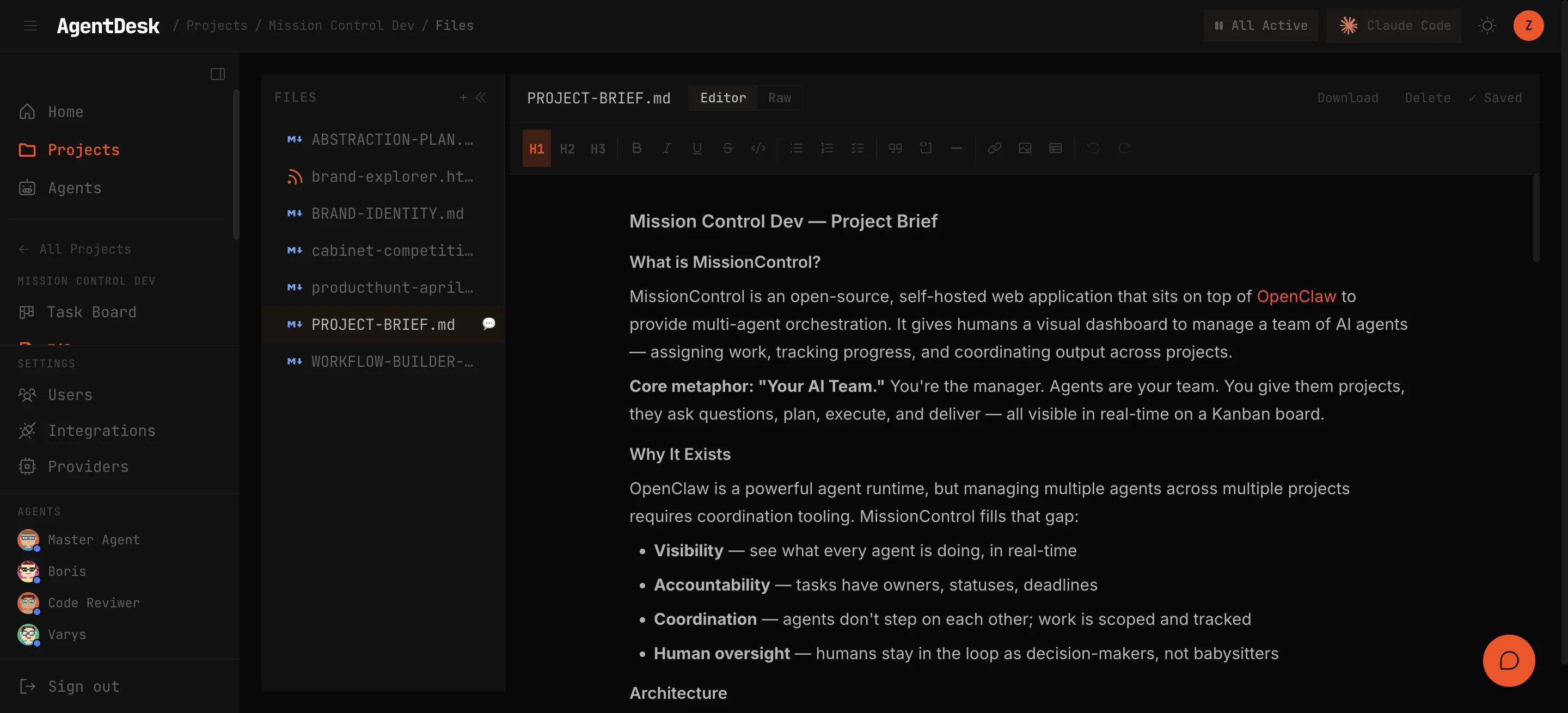
Tree View
The left panel displays the file tree with collapsible directories. Navigate your project’s files just like in a code editor.
File Viewer
Click any file to open it in the viewer. AgentDesk supports syntax highlighting for 200+ languages and special rendering modes for different file types.
Code Files
Syntax-highlighted viewer with line numbers. Supports all major languages: TypeScript, JavaScript, Python, Rust, Go, Java, C/C++, Ruby, PHP, and hundreds more.
Markdown
Rendered markdown with full formatting support — headers, lists, code blocks, tables, and links.
CSV / TSV
Tabular viewer that renders CSV and TSV files as interactive tables with sortable columns.
HTML / CSS / JS
Live renderer that displays HTML files with their associated CSS and JavaScript — preview web content directly in the browser.
Inline Editor
Click Edit to modify any file directly in the browser:
- Full text editor with syntax highlighting
- Save changes back to the project workspace
- Changes are immediately visible to agents working on the project
Breadcrumb Navigation
A breadcrumb bar at the top shows the current file path. Click any segment to navigate to that directory level.
Agent Access
Agents can read and write project files using the ad-file-read and ad-file-write CLI commands. Files created by agents appear in the explorer immediately.